





The Smartest Answer to "What Temperature Should I Set My Thermostat?"
What temperature should I set my thermostat depends on the season and what you're doing, but here are the numbers most energy experts agree on:
| Situation | Recommended Temperature |
|---|---|
| Summer (at home) | 78°F |
| Summer (away) | 85-88°F |
| Winter (at home) | 68°F |
| Winter (away/sleeping) | 60-65°F |
| Sleeping (any season) | 60-67°F |
| Vacation (summer) | 82°F |
| Vacation (winter) | 55-60°F |
These baselines come from the U.S. Department of Energy and Energy Star guidelines. They balance comfort with real energy savings.
For Northeast Houston homeowners, getting this right matters more than most. Heating and cooling account for 52% of the average household's energy costs. That's more than half your utility bill tied directly to one dial on your wall.
The good news? Small changes add up fast. Shifting your thermostat just 7-10 degrees from your normal setting for 8 hours a day can cut your annual heating and cooling bill by up to 10%. That's not a rounding error — that's real money back in your pocket.
This guide covers everything you need to know: the right temperatures for every season, how to sleep better, what to do when you leave for vacation, and how your HVAC system and habits work together to keep your home comfortable without wasting energy.
What Temperature Should I Set My Thermostat for Year-Round Comfort?
Finding that "sweet spot" is often a balancing act between your wallet and your well-being. While personal preference varies, following the Department of Energy’s guidelines provides a solid foundation for efficiency.
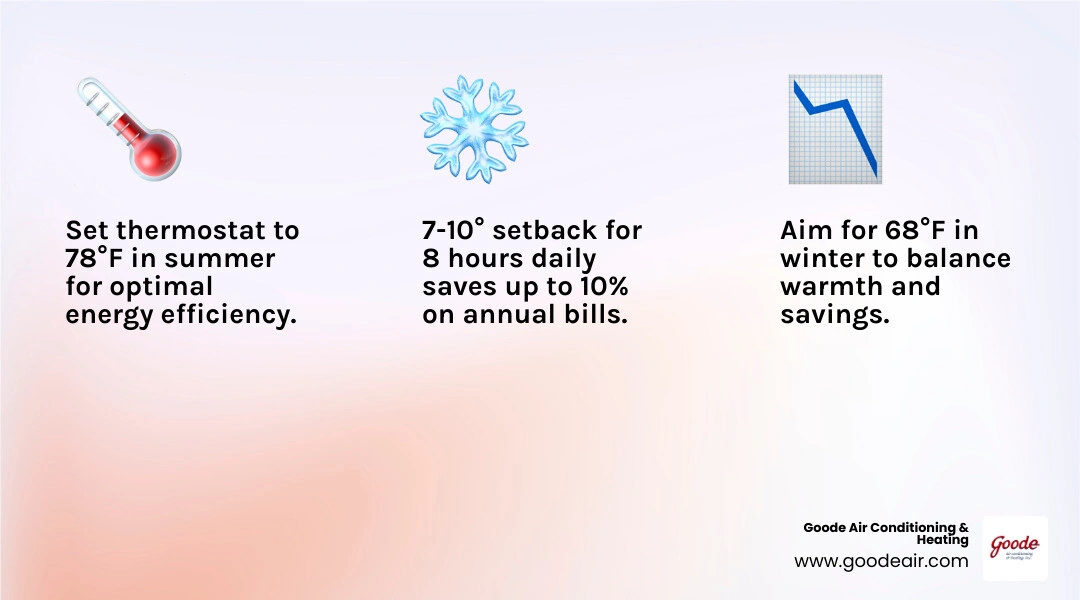
In April 2026, as we transition into the warmer months here in Texas, it’s the perfect time to evaluate your settings. The general rule of thumb is to aim for 78°F in the summer and 68°F in the winter. By maintaining these targets, you ensure your HVAC system isn't running constantly, which reduces wear and tear and keeps your energy consumption in check.
To keep your system running at peak efficiency so it can actually hit these targets, professional maintenance is key. You can learn more about scheduling your next visit by checking out How Often Should You Service Your AC in Texas.
Summer Cooling: What Temperature Should I Set My Thermostat to for Savings?
When the Texas sun starts beating down on Kingwood or Atascocita, the temptation to crank the AC down to 65°F is real. However, the Department of Energy recommends setting your thermostat to 78°F when you are home.
Why 78°F? It’s the "magic number" that balances indoor comfort with energy conservation. For every degree you set your thermostat above 72°F, you can save up to 3% on your cooling costs. If you’re currently keeping your home at 72°F, moving it to 78°F could shave nearly 20% off your monthly cooling bill.
In our humid Gulf Coast climate, your AC also acts as a dehumidifier. If 78°F feels a bit warm, try lowering it by just one or two degrees rather than a massive jump. Modern systems with variable-speed fans or two-stage cooling are particularly good at removing moisture, making higher temperatures feel much cooler. To get the most control over these settings, many of our neighbors are switching to Smart Thermostats, Sensors & HVAC Controls.
Winter Heating: What Temperature Should I Set My Thermostat to for Efficiency?
During the winter months in Crosby and Humble, the strategy flips. The recommended energy-saving temperature is 68°F while you’re awake and home.
This might feel a bit brisk if you’re used to a toasty 72°F, but it’s a highly efficient baseline. When you're asleep or away from the house, you can save even more by dropping the temperature by 7-10 degrees (down to about 60-65°F). This simple "setback" for eight hours a day can reduce your heating expenses by as much as 10% annually.
To stay comfortable at 68°F, we suggest:
- Wearing layers or using cozy blankets.
- Opening curtains during the day to let in natural sunlight (free heat!).
- Closing curtains at night to add an extra layer of insulation against the glass.
Ensuring your heater is ready to handle these adjustments without spiking your bill is part of regular upkeep. For more tips on keeping your furnace or heat pump in top shape, see our guide on HVAC Maintenance for Maximum Energy Savings.
Maximizing Efficiency with Smart Technology and Placement

The "set-it-and-forget-it" method rarely works for energy savings. If you have to remember to manually change the dial every time you leave for work or go to bed, you’re likely going to miss a few days. This is where modern technology steps in to do the heavy lifting for you.
The Role of Smart and Programmable Thermostats
Smart and programmable thermostats are the ultimate tools for anyone asking, "what temperature should I set my thermostat?" These devices allow you to create custom schedules that align with your daily routine.
- Programmable Schedules: You can set the AC to rise to 82°F while you're at the office in Humble and drop back to 78°F thirty minutes before you arrive home.
- Geofencing: Many smart models use your phone’s GPS to know when you’ve left the house, automatically shifting to "Eco Mode" to save power.
- Remote Access: If you forgot to change the settings before heading out to Lake Houston for the weekend, you can adjust it right from your smartphone.
- Learning Features: Some advanced models actually learn your habits over time, adjusting the temperature based on when you typically wake up or go to bed.
By utilizing these tools, you ensure your HVAC system only works hard when it needs to. Explore the latest options in Smart Thermostats, Sensors & HVAC Controls to see how automation can simplify your life.
Where to Install Your Thermostat for Accuracy
You could have the most expensive thermostat in the world, but if it's installed in the wrong spot, it won't work correctly. Your thermostat reads the temperature of the air immediately surrounding it. If that air isn't representative of the rest of the house, your HVAC system will "short cycle" or run too long.
Best Locations:
- Interior Walls: These are less affected by outdoor temperature swings than exterior walls.
- Central Areas: A hallway or living room that sees frequent use is ideal.
- Five Feet Up: Air naturally layers by temperature; mounting the unit about five feet off the floor gives the most accurate average reading.
Avoid These Spots:
- Direct Sunlight: A sunbeam hitting the sensor will make the thermostat think the whole house is hot, causing the AC to run unnecessarily.
- Above Air Vents: The "ghost" of a cold or hot draft will trick the sensor.
- Near the Kitchen: Heat from the oven or stove can throw off readings by up to 10 degrees.
- Near Doors or Windows: Drafts from opening doors will cause the system to fluctuate wildly.
Beyond the Dial: Comfort Strategies and System Care
While the thermostat is the brain of your home comfort, it shouldn't have to do all the work alone. There are several ways to supplement your HVAC system's efforts to keep you comfortable at more efficient temperatures.
Using Ceiling Fans and Humidity Control
Ceiling fans are a Texan's best friend. While a fan doesn't actually lower the temperature of a room, it creates a "wind-chill effect" on your skin, making you feel up to 4 degrees cooler.
- Summer (Counterclockwise): Set your fan to spin counterclockwise to push a breeze directly down. This allows you to raise your thermostat by about 4 degrees without losing comfort.
- Winter (Clockwise): Set your fan to spin clockwise at a low speed. This pulls cool air up and pushes the warm air trapped at the ceiling back down to the living space.
Additionally, managing humidity is vital in Northeast Houston. Ideally, indoor humidity should stay between 30% and 50%. If your home is too humid, 78°F will feel swampy and uncomfortable. A well-maintained AC unit naturally removes moisture, but in extreme cases, a whole-home dehumidifier can help you maintain comfort at higher thermostat settings.
HVAC Maintenance for Peak Performance
Your thermostat is only as good as the HVAC system it controls. If your system is clogged with dust or low on refrigerant, it will struggle to reach your target temperature regardless of what the dial says.
- Filter Changes: This is the single most important DIY task. Change your filters every 30 to 90 days. A dirty filter restricts airflow, forcing your system to work harder and use more energy.
- Annual Tune-ups: Just like a car, your AC and heater need professional inspections. We check for electrical issues, clean the coils, and ensure the system is operating at peak efficiency.
- Clear Obstructions: Ensure that furniture, rugs, or curtains aren't blocking your supply or return vents. Your system needs to "breathe" to circulate air effectively.
For a deeper dive into how maintenance saves you money, read HVAC Maintenance for Maximum Energy Savings.
Frequently Asked Questions about Home Temperatures
What is the best thermostat setting for sleeping?
Most sleep experts recommend a cooler environment for the best rest, typically between 60°F and 67°F. Your body temperature naturally drops as you fall asleep, and a cool room helps facilitate this process.
However, if you have an infant in the house, safety is the priority. For a nursery, the recommended range is slightly warmer, between 65°F and 74°F, to ensure the baby stays comfortable without the need for heavy blankets, which can be a safety hazard.
Should I turn my HVAC off when I’m on vacation?
We generally recommend not turning your system completely off. In the summer, an "off" system allows humidity to build up, which can lead to mold growth or damage to wood furniture and flooring. Instead, set it to 82°F or 85°F.
In the winter, turning the heat off can lead to frozen pipes if a sudden cold snap hits. A "vacation" setting of 55°F to 60°F is enough to protect your plumbing while keeping energy use to a minimum.
How does humidity affect my thermostat choices?
In Houston, humidity is the "hidden" factor in comfort. High relative humidity prevents sweat from evaporating off your skin, which is how your body cools itself. This is why 78°F in a dry climate feels great, but 78°F in Houston can feel "heavy."
If you find yourself constantly lowering the thermostat just to feel "less sticky," you might actually have a humidity problem rather than a temperature problem. Ensuring your system is properly sized and maintained allows it to run long enough cycles to effectively pull moisture from the air.
Conclusion
Finding the perfect answer to "what temperature should I set my thermostat" is about more than just a single number; it's about understanding how your home, your habits, and your HVAC system work together. By sticking to the 78°F/68°F guidelines and utilizing setbacks when you're away, you can enjoy a comfortable home in Northeast Houston without overpaying on your utility bills.
At Goode Air Conditioning & Heating, we’ve spent the last 50 years helping our neighbors in Kingwood, Humble, Atascocita, and throughout Northeast Houston find their "home sweet spot." As a family-owned business, we pride ourselves on transparent pricing and our 100% satisfaction guarantee.
Whether you need a seasonal tune-up to ensure your system can handle the summer heat or you're ready to upgrade to the latest Smart Thermostats, Sensors & HVAC Controls, we are here to help. Give us a call today and let's make sure your home stays comfortable all year long!

Customer Testimonials
See why so many homeowners trust Goode Air Conditioning & Heating, Inc.—our 4.8-star Google rating and hundreds of happy customers speak to the quality, care, and service we deliver every day.

The technician Goode AC is one of the best businesses I know of. I have had their annual maintenance check up for several years. I’m so impressed with the technician who has serviced my AC several times. Always on time, pleasant, considerate, thorough in his work and explains the problems where I can easily understand. Thankful for doing business with professionals.
I have been a customer for at least 30 years. They have replaced 3 air conditioners, a furnace and heat exchanger. Today they replaced the air ducts in my attic that were falling apart and never been cleaned. Wonderful job, polite workers, great clean up. I can already tell the difference in the quality of the air. Love you guys!!
Great experience today with Goode Air Conditioning. Hoger, our technician, was very knowledgeable and provided excellent customer service. We look forward to our Spring maintenance visit.
I have used Goode Air Conditioning and Heating for many years. The company has excellent customer service and the technicians are knowledgeable, thorough and professional.